Agents (sidebar: Agents, route /app/agents) are Convoship's LLM-first bots. They reason over a mission and persona, match user intent to Tasks, execute Tools through a real dispatcher, and enforce Guardrails before and after each turn. They are separate from Assistants (/app/assistants), which use scripted intents and flow graphs.
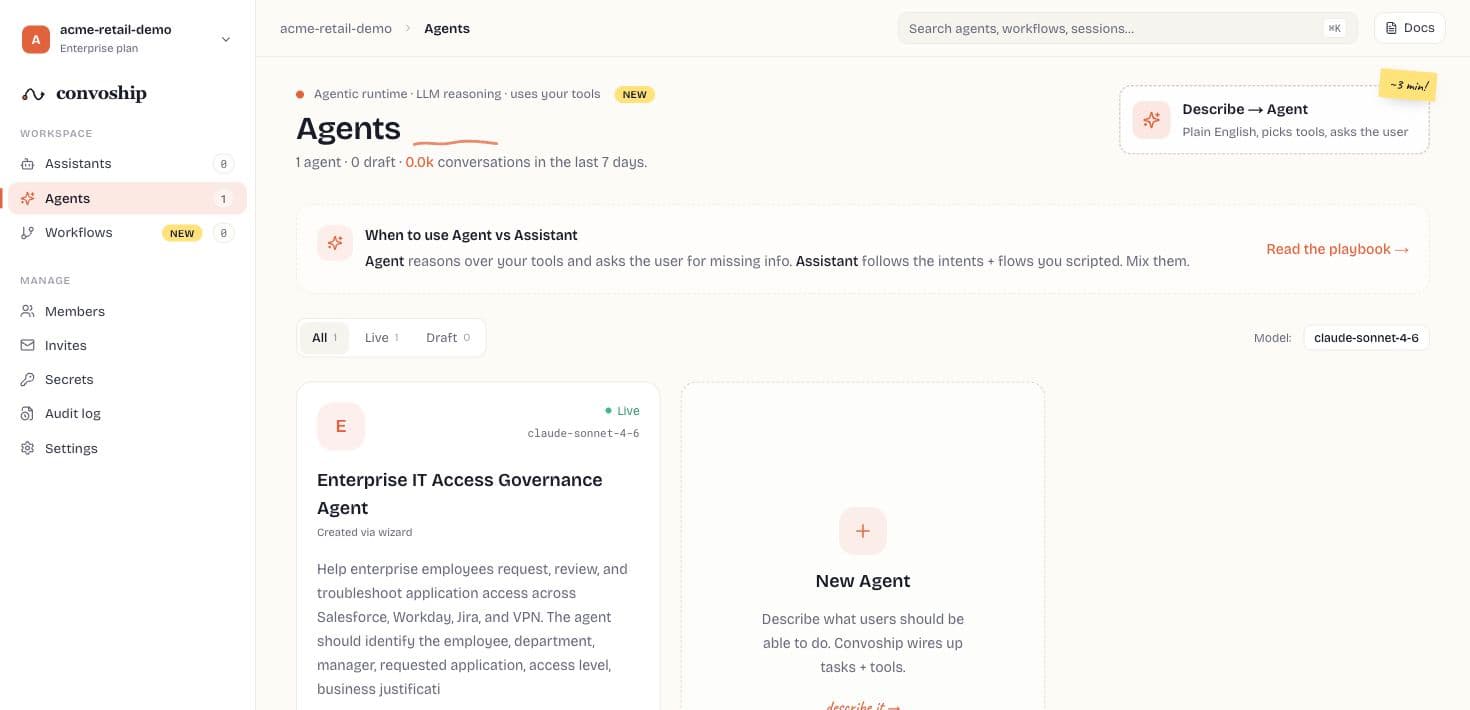
Fresh workspaces start with zero agents. Use Read the playbook on the dashboard (/docs/agent-vs-assistant) when choosing between an Agent and an Assistant.
Implementation path
- Write the mission as the operating contract for the Agent, including what it should refuse or escalate.
- Derive or create Tasks, then bind only the tools each task is allowed to call.
- Configure tool handlers with secrets, test dispatch, and verify trace output before asking the LLM to use them.
- Add Knowledge sources and guardrails, then test in Playground with realistic user phrasing.
- Run evals, publish a version, copy the publicToken embed, and monitor Conversations plus Analytics.
How a turn works
- Task match — keyword match on task examples narrows which tools the LLM may call.
- Pre-tool guardrails — AUTH, LIMIT, and BUDGET can block tool execution.
- LLM loop — multi-step reasoning with tool_use / tool_result blocks (caps: max_llm_steps_per_conv, max_tool_calls_per_turn).
- Tool dispatch — http_post, webhook (HMAC-signed), python_callable, or noop stub until configured.
- Post-reply guardrails — REDACT and ESCALATE on the outbound message.
- Persist — Playground and public embed write AiAgentConversation + AiAgentTraceEvent (PII-redacted at rest).
Landing dashboard
- Filter tabs — All, Live, Draft with live counts.
- Sort — Recently updated, Name A→Z.
- Agent cards — status, model label, task/tool counts, 7-day conversations, channel chips, auto-resolved %.
- New Agent — /app/agents/new four-step wizard with draft autosave.
Agent shell (Design + Operate)
| Tab | Route | Purpose |
|---|---|---|
| Brain | /app/agents/{slug} | Mission summary, persona, recent convos, quick stats |
| Tasks | .../tasks | Intent cards — example phrase, needs[], tool_names[], SENSITIVE/FALLBACK flag |
| Tools | .../tools | Tool catalog + handler editor (kind + JSON config) + test dispatch |
| Knowledge | .../knowledge | RAG sources (file/URL); retrieved in playground and public turns |
| Persona | .../persona | Title, tone chips, voice, boundaries |
| Memory | .../memory | Labeled memory slots for long-running context |
| Guardrails | .../guardrails | AUTH, LIMIT, REDACT, ESCALATE, BUDGET — five defaults seeded at agent create |
| Deploy | .../publish | Publish, public token, embed snippet, version history, eval pass rates, rollback |
| Playground | .../playground | Studio chat with SSE streaming (?stream=true) |
| Conversations | .../convos | Production + playground traffic |
| Evals | .../evals | Regression cases + publish trend chart + per-version drill-down |
| Audit | .../audit | AiAgentAuditEvent trail for admin mutations |
| Analytics | .../analytics | KPIs + daily conversation chart |
Publish vs draft
- Draft — editable rows (tasks, tools, guardrails) used in Playground and eval runs.
- Publish — sets status live, bumps version label (v1 → v2), mints public_token if missing, snapshots AiAgentVersion.
- Public runtime — embed and POST /v1/public/ai-agents/{public_token}/turn load the published snapshot, not draft edits.
- Eval gate — when Workspace.eval_pass_threshold > 0, publish runs all evals and blocks if pass rate is below threshold.
- Rollback — POST .../rollback/{version_id} restores a prior snapshot to the live agent.
LLM provider — default, BYOK, or your own model
The platform default is Claude (Anthropic), model Claude Sonnet 4.6. Workspace Settings → AI Agent model can override this for the whole workspace: bring your own Anthropic key, or point at any OpenAI-compatible endpoint — including a small language model fine-tuned for your workload (vLLM, Ollama, TGI; Convoship-hosted or in your own VPC). The override covers playground, evals, red-team, persona simulation, public channels, and workflow agent nodes. 'Test connection' fires a one-token completion and reports latency or the exact endpoint error; an optional, off-by-default fallback retries failed custom-endpoint turns on the platform Claude model. To create a fine-tuned model end to end, see the Models section docs.
Channels
Agents can be connected to omni-channel surfaces (web widget, Twilio, Zendesk, Genesys, ServiceNow, custom webhooks) just like Assistants. Configure channel connections from the Channels tab or the Deploy tab after publishing. Channel connections route inbound messages to the published agent snapshot.
New Agent wizard
See /docs/new-agent-wizard for step-by-step fields. Summary: Mission → Tools catalog → Behavior (persona, caps, guardrails) → Review POST /v1/ai-agents.
Related docs
- Tool handlers & dispatch — /docs/agentic-tool-handlers
- Publish, embed & versions — /docs/agentic-publish-deploy
- Playground & evals — /docs/agentic-playground
- Workspace production settings — /docs/agentic-production
- Public embed SDK — /docs/embed-sdk (AI Agent publicToken path)
- API routes — /docs/api-reference